Showing posts with label computer. Show all posts

Friday, August 7, 2026

The Friday Five Good Things

 
The Lung and Allergy Department was celebrating National Watermelon Day, 8/3/2026


Five good things that happened this week.

1. Part 1 of the antibiotic testing. A 3 hour test. I'm still allergic to the cephalosporin antibiotics, specifically Cephalexin. We stopped for lunch on the way home at the 99 Restaurant.

2. The NP was going to book the part 2 of the antibiotic testing. The earliest date middle to end of September.  A cancellation came in for Friday 8/7. I'll take it!

3. I couldn't log onto my work account or access work email on my phone. Emailed G ( from my home email address) in IT. All sorted out very quickly.

4. I made ciambotta (Italian vegetable stew) with vegetables from Himself's garden. I made it in the crockpot. Ma, why didn't we think of doing that before?

5. Teague made a delicious zucchini bread with zucchini studded with chocolate chips. The zucchini came from Himself's garden. I had a slice with my afternoon cup of tea.

How was your week?

Friday, July 3, 2026

The Friday Five Good Things


Five good things that happened this week.

1. The second time we went to Ogunquit Beach, we miraculously found parking and the parking app worked.

2. We took a drive around the coast to Kennebunk. We stopped at bookstore and I found a pencil sharpener because I forgot to bring one. The pencil sharpener was blue, too!

3. We went to the pool and met our next door motel neighbor. 

4. I actually got some stuff done during the NOK Box class.

5. I didn't have to buy a new printer. I just had to clean the print heads 100 times.

How was your week?

Thursday, April 2, 2026

TBT Reprints from CJ's Whine and Cheeze

   In 2003, Ma had a stroke. Dad was her full time caregiver until he he had a car accident that totaled the car. So in 2006, I became their chauffeur among other jobs.

At the time, to deal with the stress of running two households and working, I kept a blog entitled CJ's Whine and Cheeze. Egged on by some friends who enjoyed the first read through, you'll see your part when it comes by. 


Friday, August 31, 2007
Grandpa's Internet Cafe

At a recent family gathering, Dad was congratulating himself on the money he was saving on his phone bill. I was glad he was happy.

Since The Eldest was heading off to college after the last doctor visit, we decided to surprise Grandma and Grandpa with a visit. They were delighted to see the grandkids, and the girls happily suffered through the hugs and kisses and then escaped upstairs to play on Grandpa's computer.

After a half an hour of small talk, Dad decided he had to show me the modem that was installed for the FIOS. He was proud of the small, black tower with flashing lights. I was glad he was happy.

I turned my attention to the monitor.

"Oh, I don't know what that is, so I turn it off," explained Dad.


Help me, Lord! Windows was trying to update. There were so many updates, the poor CPU choked trying to keep up. The virus protection was also out of date.

When I tried to log on, his ISP informed me the account was cancelled and had to be reinstated to activate his account under FIOS which was installed last month.

"You haven't turned the machine on since the technician was here, have you." I meant it as a statement of fact and not a question.

"No."


I tried to re-establish the account so the virus shield could be updated. Course, we were running late so I couldn't see it to the end. I made a note to arrive early next Tues. before I had to take Ma to the foot doctor.

Himself stopped the other day to mow the lawn. While there, he had a brilliant idea. He told Dad because of the FIOS, the way to turn the machine on and off was to push the button on the monitor. This way, the machine would always be running to do Windows updates and the virus shield.

Since Dad doesn't really use the computer, if you are in the area, I invite you to park in front of Dad's house. You'll have a ready Wi-Fi hot spot. Fire up your laptop and follow the wizard to establish the network connection. Welcome to Grandpa's Internet Café!

Friday, March 13, 2026

The Friday Five Good Things


 Five good things that happened this week.

1.The Young One notified me the computer game, Inkulinati, went on sale and I bought it.

2.  A half-assed, one pot, hamburger stroganoff turned out to be pretty good.

3. It was so warm I took a tea break in the sunroom

4. I got lost in my journal.

5. I saw the first robin of Spring in Teague's yard.

How was your week?

Thursday, February 12, 2026

TBT Reprints from CJ's Whine and Cheeze

 In 2003, Ma had a stroke. Dad was her full time caregiver until he he had a car accident that totaled the car. So in 2006, I became their chauffeur among other jobs.

At the time, to deal with the stress of running two households and working, I kept a blog entitled CJ's Whine and Cheeze. Egged on by some friends who enjoyed the first read through, you'll see your part when it comes by. 


Wednesday, July 11, 2007
The Laying On of Hands

Long ago, in my former life, I was a computer programmer/consultant. Back in those days, the computer systems were the size of a Buick automobile, and programmers were treated like gods. I'd go to a client and personnel would part like the Red Sea as I walked through the office.  I would lay my hands on the machine and bring crashed programs back to life. Heady stuff along with the satisfaction of solving a problem, usually human error.

A year or so ago, we gave Dad a computer. I thought it would open up a new world for him, as well as keep him out of Ma's hair. I signed him up with America On Hold. Assured him I'd pay the bill so Ma wouldn't see anything. I'm not overly fond of AOH, but it is the easiest portal to use. I spent lots of visits with Dad going through the basics of turning the machine on and off, how to get his mail. Dad spent many hours trying percussive maintenance on the machine. h I constantly heard complaints. "They don't give me my email," as if there are little people inside the machine who like to aggravate the user. "I've never seen that screen before," in reference to the Windows logo that comes up when la machine is turned on.

DSL became available in their area through the phone company and for less money than I was paying for AOH. A lot of his complaints had to do with not being able to get online. I thought high speed would be the answer as he'd always be online. I cancelled AOH and signed him up for DSL. DSL would be better. He could surf and the phone would still be available in case of an emergency. The dial up always worried me as I thought what if there is an emergency and in their panic he forgot the phone was still connected to the computer. Yes, DSL would be better.

The phone company sent me an entire kit to make the connections, the modem, splitter for the phone. I only had one phone that proved to be a problem as it still had the four prong jack instead of the modern module system. It was an easy enough problem to solve. Since the room isn't in use, I unplugged the phone. There's a bit of residual static on the line. This from an old phone in the basement that was hard wired into the phone line. Not an approved telephone company procedure. However, it doesn't seem to interfere with the computer.

So, I got him up and running and still hear the same complaints. "They" are really out to get him.

Dad called this morning and as I thought he had given up on the computer was surprised when he said, "I turned it on, but nothing happens. It's been like this for three days."

Now, the Young One had played on the computer during the Ave Maria festivities. She didn't have any problems getting online to YouTube.

"What do you mean "nothing happens"? I asked instantly going into consultant mode.

"The screen is blank. I can hear the sound when I turn it on, but don't see anything."

"Is the computer on now?"

"No."

"Okay, turn it on and tell me what you see."

A few seconds later, I could hear the CPU drives engage and the happy chime of the Windows logo.

"There? Did you hear that? Now nothing."

"Nothing? Did you see the Windows logo on the screen?"

"No."

I started ticking off possible problems, the video card was blown, or a problem with the monitor, and I decided to go for the obvious. "Did you turn on the monitor?"

"What's that?"

"The television screen in front of you. Did you turn that on?"

"No. I never had to do that before."

I've always had to turn on his monitor, but I didn't want to get into an argument. "Ok, try turning on the mon...the television screen in front of you."

"How do I do that?"

I tried to picture his monitor. "There should be a button on the front of it."

"Oh, I see it."

"Push it."

"Oh! There it is!

Nineteen years away from the industry, and I still haven't lost my touch. I just might have to wear two cowboy hats because my head is so big. 

Friday, January 23, 2026

The Friday Five Good Things


Five good things that happened this week.

1. I enjoyed the first class of  Lindsay Ostrams' The Empty Page class

2. I have followed Dark Winds off and on. Himself was up to the episode where Robert Redford made a cameo. It was the last time Redford made an appearance as an actor on screen. I watched and now I'm hooked on the rest of the series

3. I got the camera working and with the Young One's help set up for class

4. I had a really fun chat with the Young One. She makes me laugh

5. Teague and I went to a favorite lunch spot where I had breakfast for lunch.

How was your week?

Tuesday, January 20, 2026

T Stands For Troubleshoot


I'm teaching an online class and a test run with the camera with the result of rotrow. In System, I could see the camera working, but when I ran the software, nothing. There was an error message that said to install the program from a CD. Say what? The laptop doesn't even have a CD/DVD drive.

What to do but take a sip of tea. A little too early to panic just yet. A quick trip to the manufacturer's site and a YouTube video showing an unboxing and installation. Perfect! Two ports on the back of the camera. The right port for running the camera. The left one for installing the software, but if you have a previous version, you need to uninstall.

So I uninstalled the software. Plugged the end into the left port and the USB into the computer and. Nothing! No software! No download. Play the video a little further along or you can download the software from the website. I took another sip of tea to quell the bubble of panic.

Back to the manufacturer's site and found the download button. I had another sip of tea while the download was happening. Then I clicked install. Another sip of tea as I watched the countdown. Then double clicked the software. Oh, rapture! Oh, joy! It worked.

The Young One had been standing by so I could use her eyes to tell me if my desktop was set up so that students would be able to see. Was the camera at the right angle? Could the nib of my pen be seen and not blocked by my hand? She suggested some left-right fixes and Bob's your uncle.

Hopefully, everything will work today. 🫰🏼

Drop by hosts, Bleubeard and Elizabeth's blog to find out what the rest of the T Stands For gang is up to. If you want to play, include in your Tuesday post a beverage or container for a beverage. Don't forget to link your blog to Bleubeard and Elizabeth's page.

Monday, September 8, 2025

Monet and Me


hate spaghetti. No, not the pasta, but the tangle of electrical and charging cords. Every device (usually) comes with its own charging cord. Many of the devices use the same type cord: USB-A, USB - B, USB-C, Mini-USB, Micro-USB,  Lightning cord. The chances that all of your devices need to be charged at the same time is pretty slim.

Monet and I detangled the mess and kept two of each kind. We went from the picture above to


all the cords fitting into the ark, two by two. Along with a dual  USB-A plug and a light that attaches over the camera of the laptop so you look pretty on a Zoom meeting.

The extra cords will be donated.

Thursday, August 22, 2024

Throwback Thursday


When the dinosaurs roamed the earth and I was a computer programmer, Jolt was the elixir of the deadline. We guzzled gallons of this stuff to bang out thousands of lines of code.

Did you drink this stuff?

Friday, June 28, 2024

The Friday Five Good Things


 Five good things that happened this week.

1. The Young One sent a nice picture of herself in a cute shirt with cats.

2. We had been hoping for a typical New England Saturday night supper, hot dogs with brown bread. Since Memorial Day (end of May) Himself wasn't able to find brown bread. All the store managers told him it was backordered. He finally found some at Walmart.

3.I had a no-hassle shoe return using Happy Returns at Ulta and an Amazon return at Kohl's. 

4. I bought an Apple Lightning Adapter so I could return the one on loan from the WAM IT Department.

5. This week was the last class until the Fall. We had fun doing some faux gilding.

How was your week?

Friday, May 24, 2024

The Friday Five Good Things


Five good things that happened this week.

1. Between work and Himself's birthday I wasn't able to make the weekly play date last week with Teague. We video called, the next best thing.

2. I had a Skype date with the Young One.

3. I was able to connect my iPad to the monitor in my classroom studio. Surprisingly easy to connect especially when the Head of IT loans you the correct adapter 

4. Teague and I went headstoning. Then we stopped for lunch and ice cream

5. I made pork chops with cinnamon apples like the ones at Cracker Barrel.

How was your week?

Friday, May 17, 2024

The Friday Five Good Things


Five good things that happened this week.

1. Saturday per my request we had an early Mother's Day dinner courtesy of Harry's and then we watched  the new Doctor Who.

2. I received Mother's Day greetings from The Young One and other family members

3. One of my continuing students got the green light from his surgeon to take my class. It was so nice to see him.

4. I emailed the IT Manager to ask if I needed a special app to cast or mirror the iPad to the monitor in the studio. He said it would just be plug and play and he also had the Lightning to HDMI connector so I wouldn't have to buy one.

5. Himself's birthday celebration. Take-out from Outback,  made from scratch yellow cake with chocolate frosting

How was your week?

Wednesday, May 15, 2024

Whatcha Doin?


I need to return the Apple HDMI connector. I purchased one with a USB-C end and I need one like the picture with the Lightning connector for my iPad.

Then I need to research if I need a special app to cast or mirror what's on the iPad to the monitor in the studio my class is in at the museum. I hope to be able to use the drawing app Procreate to demonstrate calligraphy.

Whatcha doin?

Friday, May 10, 2024

The Friday Five Good Things


Five good things that happened this week

1. My laptop touchpad can also function as a touch screen. I must have touched a button and the touch pad turned into a touch screen which drives me crazy. I finally figured out how to get rid of it. Simply press the F6 key.

2. The new Spring jacket with zippered pockets arrived. Now the car keys won't fall out of my pockets.

3.  Teague took me to an appointment in Boston. We took the long way home via Rte 20 (the old Boston Post Road) Such a fun road trip.

4. I was excited to see a monitor in Studio 102.  With an HDMI adapter, will I be able to connect my iPad to the monitor. I hope to be able to use the drawing program, Procreate, to demonstrate calligraphy and have what I'm doing on the iPad displayed on the monitor. I just need to get the adapter.

5. We had an early Mother's Day dessert courtesy of Himself. Chocolate covered pineapple slices and strawberries.

How was your week?

Friday, February 9, 2024

The Friday Five Good Things


Five good things that happened this week.

1. I made a lovely roast beef dinner, and he, he, Himself carved the roast beast.

2. I had an appointment in Boston and made good time going into the city.

3. Calli and I saw a bluebird at the mealworm feeder.

4. Chatted with my friend from Minnesota

5. I went to Best Buy and bought a very nice, cheap inexpensive keyboard

How was your week?

Wednesday, February 7, 2024

Whatcha doin?


I didn't think I had anything specific to do today except to teach my online class tonight. The day may have other plans. 

The number 3 key on my keyboard is stuck. I maybe be running out to buy a new keyboard.

Whatcha doin?

Wednesday, July 5, 2023

Whatcha Doin?


I’m playing with a new (to me), free, drawing app for the iPad called Concepts. It’s also available for Android devices.

I was looking for a program that I could use to create a new logo and for a digital journal especially while traveli ng and this vector drawing app seems to fit the bill. The free version has lots of tools/brushes/pens that you can use. There are other brushes/tools that you can buy selecting which ones you want or you can subscribe monthly or pay a yearly fee and get a whole slew of tools. 

I have used the drawing program, Procreate for the iPad, but I found Concepts so much easier and intuitive to use. A helpful tutorial sent when I downloaded and signed up for the app, got me up and running with suggetions on how to set up the tools. The “paper” to draw on is endless so you’re not restricted to size. Also, it seems layers are done automatically so something you don’t have to think about.

I need to play some more, but I’m happy with what I’ve been able to do “right out of the box.”

Whatcha doin?


Tuesday, June 27, 2023

T Stands for Robot Waitstaff

The Eldest's contract in Arkansas ended early so she came home for a visit. We went for dinner at the La Cantina Italiana in Framingham where the waitstaff includes


robots. The robots assist the human waitstaff. This robot at the hostess station shows the patrons to their table while listing the daily specials.


The La Cantina Italian restaurant is a comfortable, family style restaurant that has been around forever. In my teens and early twenties, this was a place to go out with friends. A lot has changed since those days.


The robots have animated cat faces and female names. When we asked our waiter why the robots all had female names, he said it was because the company that manufactured the robots used a female voice.

This is Stella. She played a tarantella while she brought me


a white Zinfandel from the bar. The first time I heard the tune, I had to check my phone as the tarantella is the ringtone I use for my Cousin M. 

For appetizers, we had stuffed mushrooms and 


shrimp cocktail. I was so busy eating and enjoying the Eldest's company, I forgot to take pictures of the food before it was devoured.


I had a salad and some delicious Italian bread


and for my entrée, my favorite, Linguini a la Vongola (linguini and clams in a red sauce)


Bella delivered drinks to another table.  An article from the local newspaper, The MetroWest Daily News  explains how the robots free up the human waitstaff to wait on customers, make the dining room more efficient, and add some fun for the customer.

Another robot delivered a birthday cake to another table and played the Happy Birthday song while the human waitstaff sang along.


Once in a while the robots develop a problem


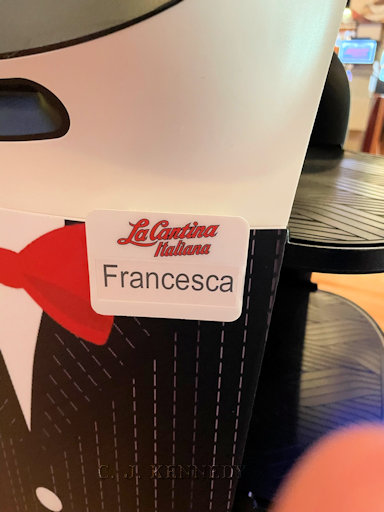
Poor Francesca got confused as to which table to deliver


the slice of Limoncello cake I had for dessert. Apologies for the crumbs as I was too busy eating and talking to the Eldest.

Drop by hosts, Bleubeard and Elizabeth's blog to find out what the rest of the T Stands For gang is up to. If you want to play, include in your Tuesday post a beverage or container for a beverage. Don't forget to link your blog to Bleubeard and Elizabeth's page.

Thursday, June 1, 2023

What Do You Do?


What do you do when you're not sure of the direction your artwork is to take? You make (colored) photocopies so you can work things out without working directly on the original.

In the example above, the original is on the left. I made two color copies. On the middle copy, I started drawing leaf and flower shapes. On the right, I drew some flourishes to suggest a heart shape.

You could also scan your artwork into your computer to use in a drawing program like Photoshop or Procreate.

What do you do?

Wednesday, May 24, 2023

Whatcha Doin?


Mr. Spock and The Young One are helping me to try to connect the iPad to a pocket projector so it will mirror what is on the iPad.

I thought I would go 21st. century for teaching students calligraphy instead of writing on a chalkboard where I sometimes make a better door than a window when I'm in front of the chalkboard. Also people at the museum have written on the chalkboard with oil pastels so not always a good surface to use chalk on as chalk was intended.

I can demonstrate letter formation and the ductus (stroke) order using Procreate and a 45 degree angle calligraphy brush and in theory can project what's on the iPad onto the wall.

The Young One has gotten a lot closer in making it so than I did.  The good thing is the chalkboard is still the fallback plan and we have 6 weeks to figure things out.

Whatcha doin? I'm happy dancing because she got things working, and I was able to replicate her instructions.